Feedback
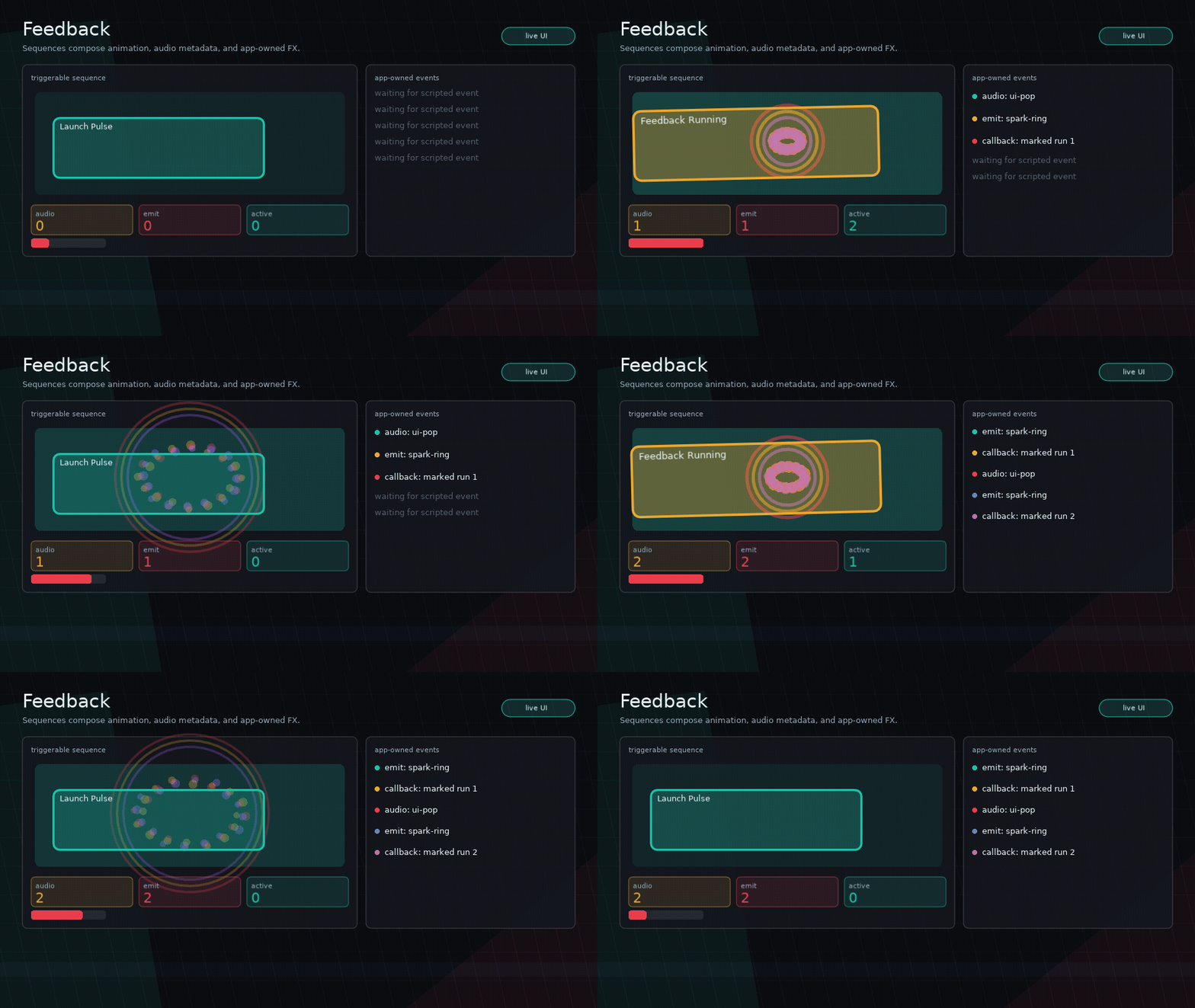
Glyph feedback sequences are small triggerable stacks for game-feel polish. They can animate a node, wait, branch into composed child sequences, emit audio cue metadata, dispatch app-owned FX events, or run a callback.
The API is named ui.feedback; “juice” is example language, not a widget namespace. Internally, Glyph delegates this behavior to the standalone feel.lua package, which can also be required directly with local feel = require("feel").
Define A Sequence
ui.feedback.define("button.pop", {
  { kind = "animate", to = { scaleX = 1.08, scaleY = 0.92 }, duration = 0.06 },
  { kind = "audio", cue = "ui-pop" },
  { kind = "emit", event = "particles", name = "spark" },
  { kind = "animate", to = { scale = 1 }, duration = 0.16, ease = "backout" },
})
Then attach it to any node:
ui.button({
  label = "Launch",
  feedback = {
    hover = "button.hover",
    press = "button.squash",
    release = "button.release",
    activate = "button.pop",
  },
})
Feedback triggers are hover, focus, press, release, activate, and error. The error trigger is manual:
Set feedback = false on a node to disable feedback.
Step Types
animate uses Glyph's visual-only Flux animation values:
Supported values are opacity, x, y, scale, scaleX, scaleY, and rotation. These do not affect layout, hit testing, focus, navigation, or accessibility snapshots.
audio emits the same app-owned audio callback shape as interaction cues:
emit dispatches a feedback runtime event for particles, camera shake, haptics, splats, or other app-owned systems:
ui.on("feedback", function(event)
  if event.kind == "shake" then
    cameraShake(event.payload.amount)
  end
end)
callback runs a function with the feedback context:
The Feel runner also supports composition steps through Glyph: wait/pause, play, parallel, repeat, random, and log.
ui.feedback.define("slot.drop.good", {
  {
    kind = "parallel",
    steps = {
      { kind = "audio", cue = "inventory-drop" },
      { kind = "emit", event = "spark", payload = { count = 12 } },
      { kind = "animate", to = { scale = 1.08 }, duration = 0.06 },
    },
  },
  { kind = "wait", duration = 0.03 },
  { kind = "animate", to = { scale = 1 }, duration = 0.14, ease = "backout" },
})
Use restart and key when repeated triggers should replace a previous run on the same node:
Manual Playback
ui.feedback.play({
  { kind = "animate", to = { scale = 1.1 }, duration = 0.08 },
  { kind = "animate", to = { scale = 1 }, duration = 0.14 },
}, node)
Use ui.feedback.clear() in tests or app teardown when registered sequences should be reset.
Use ui.feedback.clear(node) to stop and clear feedback values for one node target while keeping registered sequences intact.
You can inspect sequence state when coordinating app-owned systems:
local ok, err = ui.feedback.validate(sequence)
local active = ui.feedback.active()
local busy = ui.feedback.isPlaying(node, "slot.drop")
Standalone Feel
feel.lua is framework-agnostic. It owns sequence registration, target values, Flux-backed tween playback, and emitted metadata; it does not know about Glyph nodes or Love2D.
local feel = require("feel")

feel.define("button.pop", {
  { kind = "animate", to = { scale = 1.08 }, duration = 0.08 },
  { kind = "emit", event = "particles", payload = { name = "spark" } },
  { kind = "audio", cue = "ui-pop" },
})

local target = feel.target({ label = "Launch" })
feel.play("button.pop", target, {
  trigger = "activate",
  emit = function(event) end,
  audio = function(event) end,
  markDirty = function() end,
})

feel.update(dt)
When Menori is available, ui.menori.new can use the optional feel.menori
adapter for 3D node, camera, animation, and uniform feedback. Glyph still owns
the UI layer; Menori and Feel remain app-provided optional systems. See
Menori Adapter.
Core Boundary
Glyph runs the sequence and emits metadata. It does not own particles, camera shake, haptics, sound loading, or game-specific widgets.
Use examples or app code for:
- blob buttons
- ink/splat visuals
- screen shake
- particles and confetti
- sound packs
- game-specific shaders